
The face shows the day as a 24-hour dial, not a 12-hour clock. Noon is at the top and midnight at the bottom.
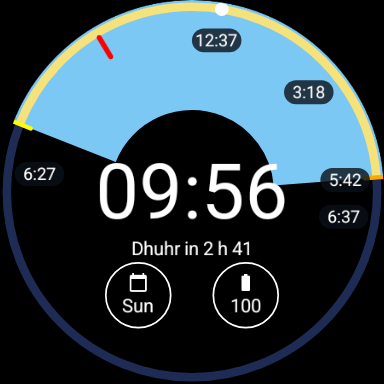
- The day is a sky-blue arc, and the night is dark blue. The arcs begin and end at your sunrise and sunset, so the day arc is shorter in winter and longer in summer.
- The red mark shows where you are now.
- The prayers: Fajr, Dhuhr, Asr, Maghrib and Isha are written at their position on the dial, with sunrise.
- The line under the time, for example Dhuhr in 2 h 26, is the time left to the next prayer. After Isha it counts to tomorrow’s Fajr.
- Two complications: date and battery by default. Change them in Customize.
- Stars appear in the night part.
- Always-on display: a dim version of the same layout, drawn to spare the screen.
- Tap the line under the time to open the prayer settings.
When the face shows a message instead of times
| Message | Meaning | What to do |
|---|---|---|
| Set your city | No city chosen yet | Open the app and choose one |
| No sunrise today | At your city the sun does not rise or set today (polar day or night) | Nothing: prayer times cannot be computed that day |
| Allow exact alarms | The system blocks exact alarms, so alerts cannot be trusted | Allow exact alarms for the app in the watch settings |
| Allow notifications | Notifications are blocked, so alerts cannot be shown | Allow notifications for the app |
The face never shows invented times.
Pro
The Pro face adds the weather scene and temperature in the day sector, the moon at night, the earth in the centre, time colours, and the small mark for the daily verse. See Pro features.